Automatic audio ducking for Windows — VolumePilot
"Intelligent Audio Ducking for Streamers, Gamers, and Creators."
VolumePilot automatically lowers background audio when you start speaking, then smoothly brings it back when you stop. It runs locally on Windows using fast WASAPI capture — no cloud processing, no accounts, no audio uploads.
EXEWindows Installer (EXE) build.
The Volume Struggle
Listening and speaking shouldn’t require constant volume micro-management.
Voice Dictation Errors
Background music or game audio interferes with Windows voice dictation, Whisper models, and ChatGPT voice inputs, leading to terrible transcription accuracy.
Deafening Calls & Games
While you speak during Discord calls, Zoom meetings, or gaming sessions, loud background sounds make you inaudible to others and vice versa.
Manual Volume Fatigue
Manually pausing music or dragging mixer sliders up and down every time you want to say something is incredibly frustrating and breaks your flow.
Simple. Automatic. Elegant.
VolumePilot does the heavy lifting, monitoring your voice and lowering back-channel audio in real-time.
Select Microphone
Choose any connected input device. VolumePilot monitors microphone level locally through WASAPI.
Choose Target Audio
Choose System Master Volume in Free, or select a specific app with Pro.
Start Listening
Hit start. VolumePilot sits quietly in your system tray, designed to stay lightweight in the tray.
Speak & Duck
As soon as you speak, target volume drops to your exact preferred level and smoothly restores when you stop speaking.
Screenshots
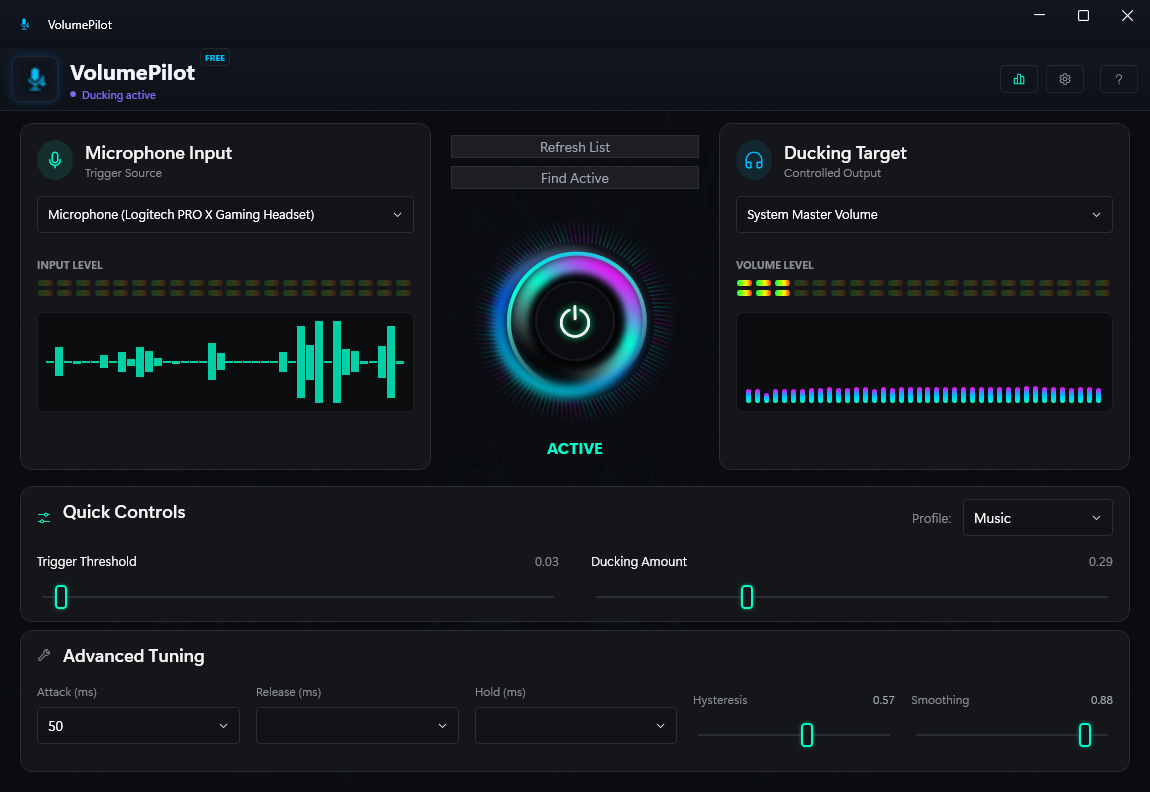
Real VolumePilot screenshot preview
Explore the lightweight, native Windows interface.
Tailored for Windows Power Users
Designed to feel like a native, lightweight utility built for productivity and flow.
System Volume Ducking
Lower the master volume of all system applications simultaneously with one voice trigger.
Per-App Audio Control
Target and lower a specific background app, such as Spotify or Chrome, without lowering other applications.
Find Playing App
Quickly detect which background application is actively producing sound and target it with a single click.
Advanced Audio Tuning
Configure Attack, Release, and Hold times, along with Hysteresis and volume smoothing levels for natural fade-ins.
System Tray Integration
Minimize VolumePilot to the system tray to keep your desktop clean. Runs quietly in the background.
VolumePilot Free vs Pro Tier
Compare the implemented features available in the current Free and Pro editions.
| Feature | FreeIncluded | ProPremium |
|---|---|---|
| System Master Volume Ducking | ||
| Real-time WASAPI Capture | ||
| Automatic Ducking + Manual Start/Stop | ||
| Restore Volume Now | ||
| System Tray Mode | ||
| Default & Modern UI Layouts | ||
| Light & DefaultDark Themes | ||
| Wave & Bars Audio Visualizers | ||
| Blocks Indicator + Minimal Slider/Knob | ||
| Profiles: Dictation, Music, Gaming, Streaming & Meetings | ||
| Trigger Threshold & Ducking Amount | ||
| Attack, Release, Hold, Hysteresis & Smoothing | ||
| Per-Application Audio Ducking | ||
| Find Playing App | ||
| Studio & Compact UI Layouts | ||
| Cyberpunk & Midnight Premium Themes | ||
| Custom Accent Color | ||
| Hex, Pulse, Dots, Circular & Particles Visualizers | ||
| Desktop Wallpaper Mode | ||
| Dots/Lines Indicators + Cyber/Studio Controls | ||
| Custom Profile, Save/Reset & MODIFIED | ||
| Start with Windows | ||
| Built-in Update Check & Installation |
💡 Pro features are implemented and license-gated. The Free/Pro split below reflects the current application.
⚠️ Buy Pro securely through Paddle. Your activation key is shown immediately after checkout and can be entered in VolumePilot.
Get VolumePilot Today
Download the Free edition for System Master Volume ducking on Windows.
Download VolumePilot Free for WindowsRelease date:
SHA-256: C4924BA2351927A253A94C0FE6B7DF79D32CCCFA61A183A955DB7DBE8FD6BBB3
⚠️ SmartScreen Warning Notice
Because this is an early unsigned build, Windows Defender SmartScreen may show a popup saying "Windows protected your PC". Click "More Info" and then "Run anyway" to launch the utility.
Our Privacy Guarantee
Your audio never leaves your machine. Period.
VolumePilot processes all microphone levels strictly on your local PC. No audio stream is ever stored or recorded.
Microphone audio is processed locally and is not uploaded. The built-in update manager may use the network to check for and install updates.
Your conversations are completely confidential. VolumePilot only measures volume amplitude, not speech content.
Settings are stored locally in standard AppData files. No user accounts, registration, or logins are needed.
Frequently Asked Questions